🌱 Free Mac app · Lives in your menu bar

Grow with
intention.

A tiny plant that lives in your menu bar. Set reminders, care for it daily, and watch it bloom — one habit at a time.

5
Growth stages
Free
Always
macOS
13+ Ventura
Bloomer plant
One command away

Install in seconds
with Homebrew

No App Store. No account. Just paste and press enter.

Step 01
Get Homebrew
If you don't have Homebrew installed yet, paste this in Terminal first.
Step 02
Add the tap
Add Liks' Homebrew tap so your Mac knows where to find Bloomer.
Step 03
Install Bloomer
Install the cask and Bloomer appears in your menu bar instantly.
Terminal — Step 1 (skip if you have Homebrew)
# Install Homebrew (skip if already installed)
$ /bin/bash -c "$(curl -fsSL https://raw.githubusercontent.com/Homebrew/install/HEAD/install.sh)"
Terminal — Step 2
# Add the Bloomer tap
$ brew tap likhith1542/homebrew-bloomer
Terminal — Step 3
# Install Bloomer
$ brew install --cask bloomer
🌱 Installing Bloomer...
✅ Bloomer is now in your menu bar
Terminal — Update anytime
# Keep Bloomer up to date
$ brew upgrade --cask bloomer
🔒 First launch may show a security prompt — right-click the app → Open to proceed. This is a one-time step.
What makes it special

Everything you need,
nothing you don't

🌿
Lives in menu bar
Bloomer sits quietly at the top of your screen. No windows, no Dock icon — just a tiny swaying plant always within reach.
Smart reminders
Set daily, weekly, or custom interval reminders. When it's time to care, macOS notifies you with a water drop sound.
🌱
5 growth stages
Your plant starts as a seed and grows through Sprout, Seedling, Plant, and Bloom — each stage a milestone worth celebrating.
🎯
Your targets, your pace
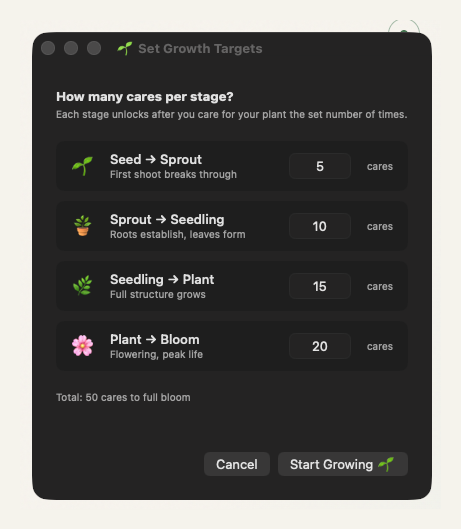
Set exactly how many cares each stage requires. 5 or 500 — you decide how long each phase of growth takes.
💾
Persistent memory
Your plant's progress is saved forever. Restart your Mac — your plant picks up exactly where you left off.
🌙
Dark & light mode
Adapts automatically to your macOS appearance. The plant looks beautiful in both — crisp greens on dark, rich on light.
Simple by design

Four steps to
full bloom

1
Install
One Homebrew command. Bloomer launches straight into your menu bar.
2
Set targets
Choose how many cares each growth stage needs — from 5 to 500.
3
Add reminders
Daily, weekly, or custom intervals. Bloomer nudges you when it's time.
4
Watch it bloom
Care for your plant consistently. Watch it grow through all five stages.
🌰
Seed
The beginning. A tiny bump of possibility.
Start
🌱
Sprout
First shoot. The habit takes root.
5
🪴
Seedling
Leaves emerge. Consistency builds.
10
🌿
Plant
Full structure. The habit is strong.
15
🌸
Bloom
Peak life. You made it.
20

Growth at
your pace,
on your terms.

There's no right answer for how long each stage takes. Some people want to reach bloom in a week. Others take a year. Bloomer doesn't judge — it just grows with you.

💡
Tip: Match your cares to a real-world habit. Water your plant every time you meditate, exercise, or finish a deep work session.

One command.
A lifetime of bloom.

Free forever. No account. No tracking. Just you and your plant.

$ brew install --cask bloomer

macOS 13 Ventura or later  ·  Apple Silicon & Intel  ·  Free